 testy.cool
Refined LinkedIn is a free, open-source Chrome extension for LinkedIn's job search. It folds each job description down to the work and what they expect from you, and it greys out the jobs you've already opened.
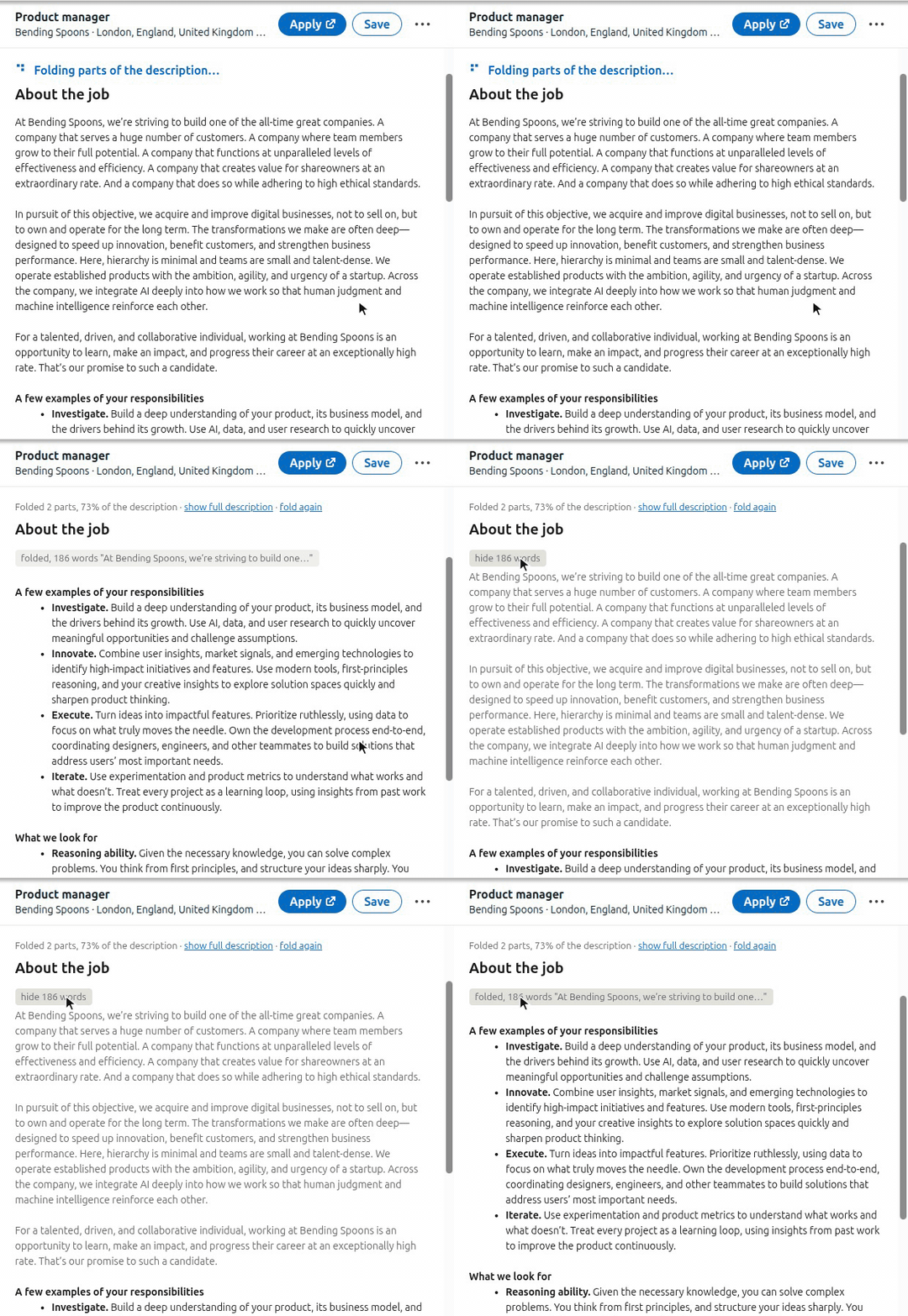
What it does
When you open a job, an AI reads its description and finds the parts that are not the work or the requirements: the story about the company, the perks, the legal text. The extension folds those parts into grey lines. Each grey line says how many words it hides, and a click opens it.
Some examples of what else it does:
- Lines about years of experience, degrees or language levels stay visible, even inside a fold.
- It clicks LinkedIn's "see more" button for you.
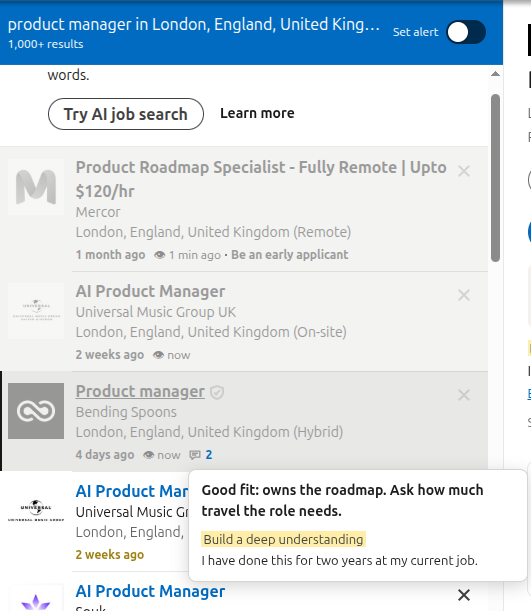
- Jobs you've opened turn grey in every job list, with how long ago you saw them. A job reposted under a new link still counts as seen.
- Each job's age is coloured, from green for a day old to red for two months.
- You can write a note on a job, or on one sentence of its description. Hovering the note icon in the list shows your notes without opening the job.
- Words you add, like "remote" or "Python", show up in blue in every description.
Why I made it
So the LinkedIn job search is garbage. If you mark the jobs that you've visited, you'll notice that even when you refresh immediately, say you go through the first 10 pages and then you refresh and start over again, 90% of the jobs you will have already visited.
On top of that, 90% of descriptions are long. They start with general information about the company, which after you've been through like 20 job listings and you can't find something, you're already over it. You don't want to have to deal with that.
And on top of that, every time you have to click more to see more, and then you have to sift through it with your eyes and your brain to figure out the details of the job, only to find like often some dense bullet points where everything looks good at a glance, but there are some points which indicate that you're not a good fit.
So most of the time you're just wasting time on LinkedIn, and I'm confident that they do this on purpose. It's impossible for them not to do this on purpose.
Setting it up
Install it from the Chrome Web Store. The settings open after you install it. Tick the box that lets the extension send job descriptions to an AI, then choose the AI. The code and a zip of each version are on GitHub.
I use it with GPT-6 Luna on medium, and you can just connect your ChatGPT account or you can use an API key, as you can see in the settings. The API key can be for Google Gemini or for any service that works like OpenAI's API.
Probably the folding aspect is not exactly perfect, but I think it does the job reasonably well. When a fold looks wrong, "fold again" asks the AI again, and you can change the instructions the AI gets in the settings.
Your data
It's entirely free and open source. No data goes to me. You keep all the data.
The extension sends nothing until you tick that box. After that, only the text of the job descriptions you open goes to the AI you chose, once per job. Your notes, your words and the list of jobs you've seen stay in Chrome on your computer.
Anyone can contribute if they have anything to add, and any feedback is welcome. I just try to make it as easy to use as possible.
If you'd rather work with job posts as data, Scry has 1.7 million live job postings you can query.
Refined LinkedIn is not made or endorsed by LinkedIn.
Last updated on